fasthtml
FastHTML Todo App
This project implements a simple Todo list application using FastHTML, showcasing dynamic updates and database integration.
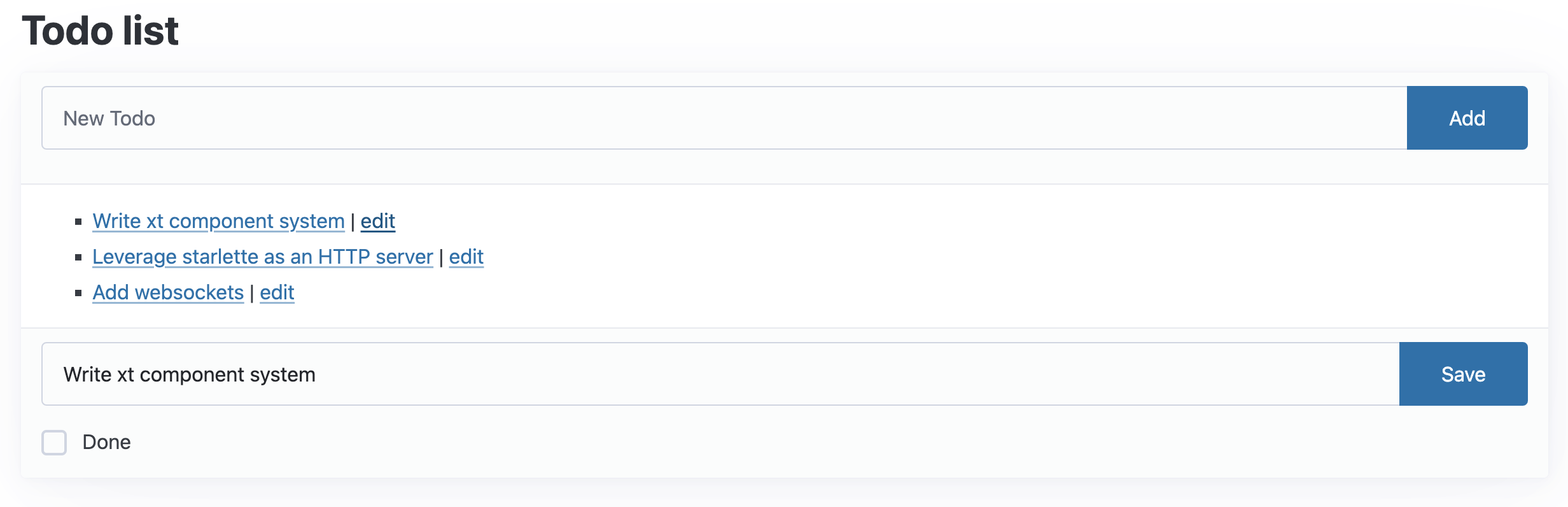
Features
- Add, edit, and delete todo items
- Mark todos as complete
- Real-time updates without page reloads
- SQLite database integration
Technology Stack
- FastHTML: A Python framework for building dynamic web applications
- HTMX: For seamless client-side updates without full page reloads
- SQLite: For persistent data storage
Implementation Highlights
App Setup and Database Integration
FastHTML makes it easy to set up a database-backed application:
app,rt,todos,Todo = fast_app(
    'data/todos.db',
    hdrs=[Style(':root { --pico-font-size: 100%; }')],
    id=int, title=str, done=bool, pk='id')
This single line sets up our app, routing, database connection, and Todo data model model using the fast_app function. However, you can use the standard FastHTML class to set up your app and database function from fastlite to create your database manually.
app = FastHTML(hdrs=[Style(':root { --pico-font-size: 100%; }')])
rt = app.route
db = database('todos.db')
if 'Todo' not in db.t: db.t['Todo'].create(id=int, title=str, done=bool, pk='id')
Todo = db.t['Todo'].dataclass()
Todo Item Rendering
Each todo item is rendered as an HTML component:
@patch
def __ft__(self:Todo):
    show = AX(self.title, f'/todos/{self.id}', id_curr)
    edit = AX('edit',     f'/edit/{self.id}' , id_curr)
    dt = ' ✅' if self.done else ''
    return Li(show, dt, ' | ', edit, id=tid(self.id))
This method defines how each Todo object is displayed, including its title, completion status, and edit link. We are taking advantage of monkey patching via the @patch decorator to add new functionality to the Todo class. If you want to learn more about monkey patching, check out this article.
Adding New Todos
Here is how we setup the form for adding new todos:
def mk_input(**kw): return Input(id="new-title", name="title", placeholder="New Todo", **kw)

@rt("/")
def get():
    add = Form(Group(mk_input(), Button("Add")),
               hx_post="/", target_id='todo-list', hx_swap="beforeend")
    card = Card(Ul(*todos(), id='todo-list'),
                header=add, footer=Div(id=id_curr)),
    title = 'Todo list'
    return Title(title), Main(H1(title), card, cls='container')
This creates an input field and “Add” button, which uses HTMX to post new todos without a page reload.
Editing Todos
Editing a todo item is handled by this route which takes the todo’s id as a parameter:
@rt("/edit/{id}")
def get(id:int):
    res = Form(Group(Input(id="title"), Button("Save")),
        Hidden(id="id"), CheckboxX(id="done", label='Done'),
        hx_put="/", hx_swap="outerHTML", target_id=tid(id), id="edit")
    return fill_form(res, todos.get(id))
This allows us to dynamically fill the form with the todo’s current data, allowing for easy editing.
TIP: What happens when hx_swap="outerHTML" is removed?
Answer: When hx_swap="outerHTML" is omitted, the default behavior is to replace only the inner HTML of the target element. This results in a nested structure <li><li>...</li></li> instead of replacing the entire list item. Using hx_swap="outerHTML" ensures that the target element itself is replaced, preventing such nesting issues
Deleting Todos
Similarly, we can do the same for deleting todos, except we use the delete method instead of get:
@rt("/todos/{id}")
def delete(id:int):
    todos.delete(id)
    return clear(id_curr)
Running Locally
To run the app locally:
- Clone the repository
- Navigate to the project directory
- Install dependencies (if any)
- Run the following command:
python main.py